



Free LinkedIn Post Analyzer (+ Guide)





A free LinkedIn post analyzer that scores your post against 1,541 real LinkedIn posts, shows it in LinkedIn's feed, and reads any post's numbers from its link.
0.0(0 ratings) by Navid Moazzez·Updated Sept 30, 2026·6 min read·Navid.me is reader-supported. When you buy through links on this site, I may earn an affiliate commission. Learn more.
Embed this tool on your site
Paste the code into any page: WordPress, Webflow, Squarespace, Ghost or plain HTML. It's free with the credit under it, which links back to navid.me.
This free LinkedIn post analyzer scores your post with a model trained on 1,541 real LinkedIn posts from 226 profiles.
Write a post or paste a link to one. You see it in LinkedIn's own feed, on a real post or on your own account, with the parts that helped or hurt in real posts. A link also gets its real numbers against the profile's typical post.
Here's what a LinkedIn post analyzer is, how the score works, what 1,541 LinkedIn posts show, and how to write posts that beat your own usual.
TL;DRKey takeaways
What is a LinkedIn post analyzer?
A LinkedIn post analyzer checks a post before you post it, or after, and shows what to change.
Most score against rules someone wrote, or ask an AI to guess. This one scores against what won: posts from the same profile, posted within 30 days of each other, where one got at least twice the reactions of the other.
How the score works
The analyzer measures 25 parts of your post: its first line, its length, numbers, lists, "I" and "you", links, hashtags, mentions, pictures and more.
A model weighs each part by how often it won those matchups. Your score says where your post lands among all 1,541: 70 means it beats 70% of them.
How accurate it is
I tested it 5 times. Each time the model learned from 4 in 5 of the 154 profiles and was graded on the fifth, which it never saw, so every profile was graded once.
Across those tests, the post it scored higher got more reactions 57% of the time, in 1,214 pairs where one post got at least twice the other's reactions. A coin flip gets 50%.
That's a hint, not a promise. The topic, the timing and the picture itself aren't in the score, and they matter more than the wording.
What 1,541 LinkedIn posts show
In pairs of posts from the same profile, where one got at least twice the reactions, this is how often the post with each part won:
- Won
- 67%
- Pairs
- 260
- Won
- 67%
- Pairs
- 120
- Won
- 64%
- Pairs
- 400
- Won
- 63%
- Pairs
- 309
- Won
- 61%
- Pairs
- 397
- Won
- 60%
- Pairs
- 335
- Won
- 60%
- Pairs
- 333
- Won
- 60%
- Pairs
- 465
- Won
- 60%
- Pairs
- 303
- Won
- 58%
- Pairs
- 337
- Won
- 57%
- Pairs
- 525
- Won
- 54%
- Pairs
- 362
- Won
- 53%
- Pairs
- 315
- Won
- 41%
- Pairs
- 136
- Won
- 40%
- Pairs
- 113
- Won
- 39%
- Pairs
- 169
- Won
- 38%
- Pairs
- 202
- Won
- 32%
- Pairs
- 192
The biggest winners: a long post (67%), a first line ending in a colon (67%) and "I" or "my" (64%). The biggest losers: a short post (32%), a video (38%) and a question in the first line (39%).
Where LinkedIn cuts a post
LinkedIn shows up to 3 lines of a post before "…more". On a phone that's about 160 characters, on a laptop about 230, fewer when you break lines.
So your first line is your headline. If it's past the fold on a phone, most people never see it.
- Limit
- 3,000 characters
- Source
- LinkedIn Help
- Limit
- About 160 characters, up to 3 lines
- Source
- Measured in a browser on 15 posts
- Limit
- About 230 characters, up to 3 lines
- Source
- Measured in a browser on 15 posts
The analyzer draws your post in LinkedIn's feed card, on a phone and a laptop, and measures where "…more" falls in your own browser. The LinkedIn post preview does the same with more options, and the LinkedIn text formatter adds bold, italic and lists.
Read any post from its link
Paste a link to any public LinkedIn post, yours or anyone's, and the analyzer reads it for you: the full text, the picture, the reactions and the comments.
Then it reads the profile's latest posts and compares. "4.1× this profile's typical post" means the post got 4.1 times the median reactions of the profile's recent posts.
That's the honest version of a virality score: not a guess about the wording, but how the post actually did against the profile's own normal.
How to write posts that beat your usual
Here's what won most often in the data:
- Say more. The longer ones did better here. Posts with it won 67% of 260 pairs.
- End the first line with a colon. "Here's how I do it:" pulls people into the rest. Posts with it won 67% of 120 pairs.
- Tell it as your own story. "I" and "my" make it yours, not advice from nowhere. Posts with it won 64% of 400 pairs.
- Add an emoji or 2. Used as a marker, not decoration. Posts with it won 63% of 309 pairs.
- Add a picture. A photo or a screenshot stops the scroll. Posts with it won 60% of 335 pairs.
- Point at the answer. "Here's" and "this" promise something is coming. Posts with it won 60% of 465 pairs.
- Use a real number. "3 things" or "$10K" is more specific than "a few". Posts with it won 58% of 337 pairs.
- Open with a number. A number in the first line tells people what they'll get. Posts with it won 57% of 525 pairs.
And what lost:
- Say more than one line. Posts of 100 characters or less won only 32% of 192 pairs.
- Try a picture instead of a video. Posts with a video won only 38% of 202 pairs.
- Answer instead of asking in the first line. Posts that open with a question won only 39% of 169 pairs.
- Skip the hashtags. Posts with a hashtag won only 40% of 113 pairs.
Then post, and let your own numbers decide. Paste the link back in after a few days to see how it did against your usual.
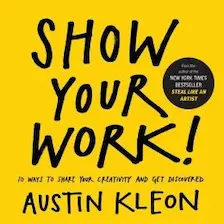
Show Your Work!

by Austin Kleon
Show Your Work by Austin Kleon teaches how to share your creative process, build an audience, and get noticed without self-promotion.
I may earn a commission if you make a purchase, at no additional cost to you.
Where the data comes from
I read the latest public posts of 226 LinkedIn profiles: creators from my creator directory, the creators in my research feed, and well-known creators in business, writing, AI, health and money. My own accounts are left out.
Replies, reposts and posts under 3 days old are left out too, because their numbers are still growing. That left 1,541 posts.
The model learned from pairs of posts by the same profile within 30 days, so the audience was the same and the wording was the difference. Each profile was graded by a version of the model that never saw it. The posts themselves stay private: only the model's weights and counts are published.
Ready to post it?


Or post it from your AI with my open source MCP servers and CLIs

LinkedIn Post Analyzer FAQs
Questions about the LinkedIn post analyzer? Here's what to know.
A LinkedIn post analyzer checks a post and shows what helps or hurts it.
This one scores against 1,541 real LinkedIn posts, not rules someone wrote.
It measures 25 parts of the post, like the first line, numbers, lists, links and pictures.
A model trained on pairs of posts from the same profile weighs each part.
On 154 profiles it never saw, the post it scored higher got more reactions 57% of the time, in 1,214 clear pairs.
A coin flip gets 50%, so use it to pick between versions you like.
In the data, posts did better with a long post (67%), a first line ending in a colon (67%) and "I" or "my" (64%).
They did worse with a short post (32%), a video (38%) and a question in the first line (39%).
Not in this data: a post with a link won 60% of 303 pairs against a post from the same profile without one.
Treat it as a hint and test it on your own posts.
LinkedIn shows up to 3 lines before "…more": about 160 characters on a phone and 230 on a laptop.
The analyzer measures it in your own browser.
Yes, paste a link to any public LinkedIn post.
The LinkedIn post analyzer reads its numbers and compares them with the profile's recent posts.
Yes, paste your LinkedIn link or username under the card and it pulls your photo and name.
You can also set them by hand.
Yes, the LinkedIn post analyzer is free, with no sign-up.
The score runs on your device.
What you write stays in your browser, so it's there when you come back.
A link is read on my server, and only the post and its numbers come back.

Navid Moazzez
AI business strategist & AI OS builder
Navid Moazzez helps creators and founders master AI and build their own AI Operating System (AI OS) to automate their business and life.

Navid.me is reader-supported. When you buy through links on this site, I may earn an affiliate commission. Read the affiliate disclaimer.
More free tools

 LinkedIn
 X
X

 Instagram
 TikTok


 Threads
Related MCP servers & CLIs

 Bluesky
 Substack
 Mastodon


 Apple Podcasts
 Free AI newsletter
The most actionable AI newsletter for founders
Every week, get proven AI strategies, curated tools, and step-by-step systems to grow your audience, create better content, and build a profitable creator business.
No fluff, no filler, no BS. Just five minutes each week that might level up your online business and life.
P.S. Sign up now to get free access to my ultimate AI tools guide for creators.
