



Free YouTube to Blog Post Converter (+ Guide)





Explore a free YouTube to blog post converter that writes the whole post from only what the video says, with quotes checked word for word.
0.0(0 ratings) by Navid Moazzez·Updated Oct 3, 2026·8 min read·Navid.me is reader-supported. When you buy through links on this site, I may earn an affiliate commission. Learn more.
A YouTube to blog post converter turns a video you've already made into a written post, so the same ideas can be found in Google and read by people who'd rather skim than watch.
This free one writes the whole post, not just an outline, from only what the video says. Every quote is checked word for word against the captions, and each section links to its moment in the video.
I built it so a video doesn't have to stay a video... and so the post never says something the video didn't.
TL;DRKey takeaways
What is a YouTube to blog post converter?
A YouTube to blog post converter is a tool that reads a video's transcript and rewrites it as a blog post, with a title, headings, key takeaways and an FAQ.
It sits between two other tools of mine. The YouTube transcript generator gives you every word as it was said, and the YouTube video summarizer gives you the short version.
A blog post is neither of those. It keeps the video's ideas and examples, but it's written to be read, in the order a reader needs them.
How to turn a YouTube video into a blog post
It takes about a minute, and you can stop and edit at each step:
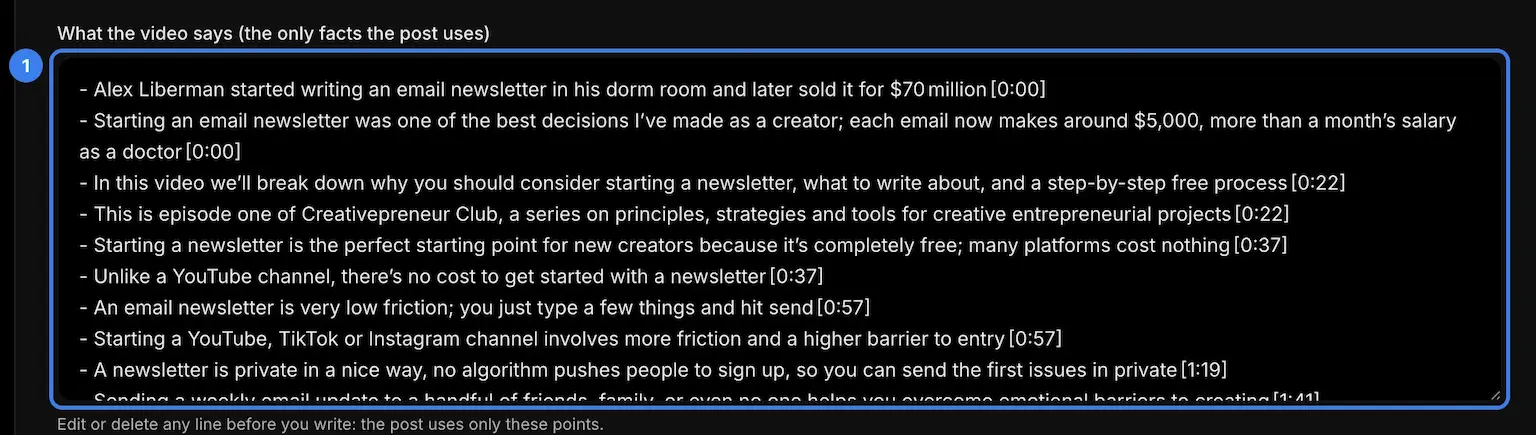
- The notes – every point the video makes, in order, each with the time it's said. They're the only facts the post may use, so fix a misheard name here.
Want to see a result before you paste your own? Press the example under the link box, and the page fills in the run from the next section, the whole post included.
A real example: Ali Abdaal's newsletter video
For the example I used Ali Abdaal's "How to Start an Email Newsletter", a 14-minute video with four chapters. Here's what the converter made from it:
| Step | What it made |
|---|---|
| The captions | 3,684 spoken words, read in 3 parts |
| The notes | 55 points with their times, plus 8 quotes checked against the captions |
| The post | 1,561 words, 7 sections and 6 FAQs |
| Quotes in the post | 5, each one word for word from the video |
| Moments linked | 11 points that open the video at the second they're said |
| Numbers | 7 of 8 found in the video |
The one number it flagged was "$7", from the post's "$5-$7 k". The video says sponsors pay $5,000 to $7,000 a slot, so the flag pointed straight at the line to fix.
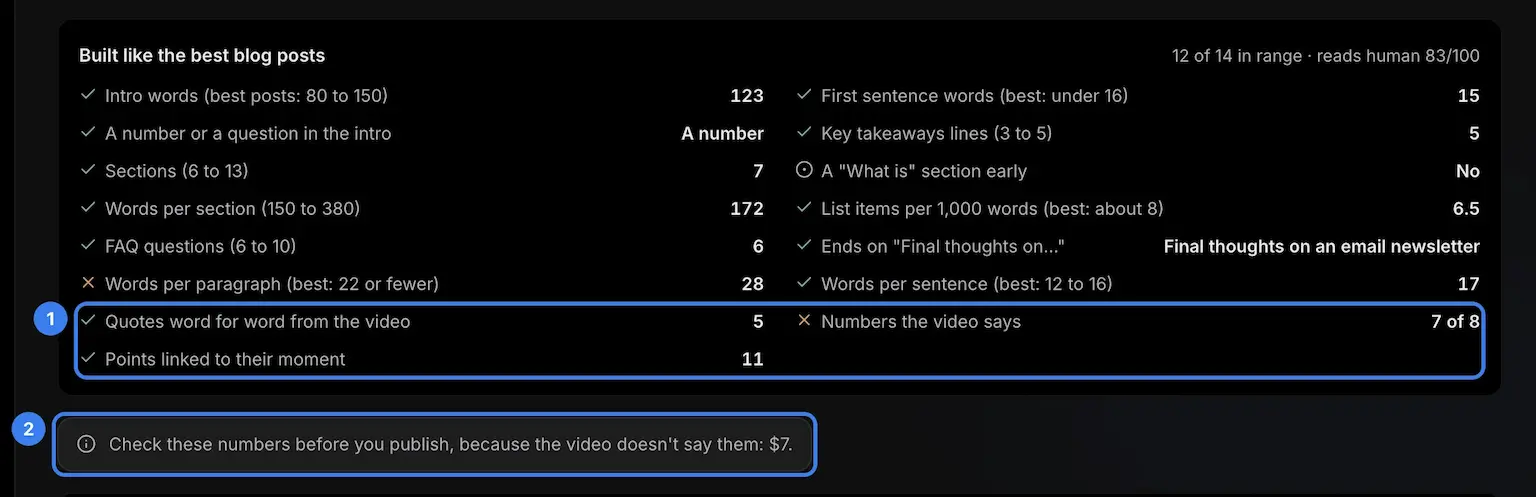
- The video checks – how many quotes match the video word for word, and how many of the post's numbers the video really says.
- The numbers to check – anything the post says that the video doesn't, listed before you publish.
The fact check fixed a heading that said "Submask" instead of Substack. It also kept Tim Ferriss's 5-Bullet Friday with Tim Ferriss.
That second one matters. In an early test, a post written in Ali's voice claimed Tim's newsletter as Ali's own, and that's exactly what the fact check is there to stop.
The post scored 12 of 14 checks against the best blog posts and read 83 out of 100 for sounding human. Its paragraphs ran long, 28 words where the best posts keep about 22.
How the converter works
Each step has one job, and the checks at the end are code, not AI:
| Step | What happens |
|---|---|
| Read | The video's own captions on YouTube, or speech to text for videos from the other apps, up to 5 minutes |
| Notes | Every point, step, number and name the speaker gives, in order, each with its time |
| Plan | Sections in the video's order, following its chapters when it has them |
| Write | Each section from the notes for its own stretch of the video, so sections don't repeat each other |
| Fact check | A second pass puts each story back with its person and cuts what the video doesn't say |
| Quotes | Kept only when the words are in the captions, minus the ums |
| Numbers | Each one looked for in the captions, and the ones the video never says listed for you |
| Times | Each section links to its moment on YouTube |
Then the post gets the same scoring as my AI article writer: intro length, takeaways, sections, FAQ and how human it reads.
Why the post only uses what the video says
An AI writer left alone fills gaps with general advice. From a video, that's worse than useless, because the post then puts words in the speaker's mouth.
So the notes are the only facts the post may use. When the video doesn't cover something, the post leaves it out instead of guessing.
Names need a second look, because captions mishear them. YouTube's own help page says automatic captions "might misrepresent the spoken content due to mispronunciations, accents, dialects, or background noise."
That's why the notes come first. Fix a misheard name once, before the post is written, and it's right everywhere.
Which videos make the best blog posts
Videos where someone explains something make the best posts. Here's how the main kinds compare:
| Kind of video | How the post comes out |
|---|---|
| A how-to or explainer | The best fit: its steps and examples map straight to sections |
| An interview or podcast | Good: pick They and check the names in the notes |
| A screen tutorial | Good, but add screenshots of what the video shows |
| A vlog | Thin, since little is said to write from |
| Music or b-roll | Nothing to read, so no post |
Length matters too. A short video makes a short post, however long you ask for, because the post can't run much past 70% of the words spoken.
Voice, tone, language and length
The settings change how the post sounds, never what it says:
- Voice – I for your own video, They for someone else's (written about them by name), or We for a team's.
- Tone – 24 tones, from friendly to storytelling.
- Language – 75 languages, and the post doesn't have to match the video's.
- Length – about 800, 1,200 or 2,000 words, as far as the video can carry it.
Writing from someone else's video? Use They, link the video, and quote only what the notes' quotes say.
Should you turn your videos into blog posts?
If the video says something worth keeping, yes. A post reaches people who search Google and readers who skim, and it carries the video, so each one sends people to the other.
Skip it for videos built on visuals or trends. A post from those reads thin, and a thin page does nothing for your site.
No blog yet? My guide on how to start a blog walks through the setup, and how to make money blogging covers what comes after.
Make the post yours before you publish
A draft from your video is a strong start. These steps turn it into a post people finish:
- Read it once, top to bottom – change anything that doesn't sound like you.
- Check the flagged numbers and names – the note under the checks lists what the video never says.
- Add what the video showed – a screenshot wherever you demo something.
- Sharpen the title – test it with the headline analyzer.
- Write the title tag and description – the meta title generator and the meta description generator measure both where Google cuts them.
- Keep the video in it – the link under the key takeaways becomes the player.
Then read it once more for AI tells with the AI slop checker before it goes live.
Will Google rank a post made from a video?
Google doesn't rule out AI. Its own guidance opens with this: "Generative AI can be particularly useful when researching a topic, and to add structure to original content."
Your video is the original content here, and the converter adds the structure.
Google also warns that "using generative AI tools or other similar tools to generate many pages without adding value for users may violate Google's spam policy on scaled content abuse."
So turn the videos that say something into posts, and add what only you know before you hit publish.
How to embed the video in WordPress
The post keeps the video's link on its own line, right under the key takeaways. In WordPress, that link goes into an Embed block.
WordPress's own docs put it this way: "Using the generic Embed Block, you can paste the URL from the third-party site that you want to embed the content such as YouTube."
It also has a YouTube Embed block that works the same way.
What gets lost when a video becomes a post
Some of a video doesn't survive as text, and it's worth knowing which parts:
- What's on screen – demos, charts and slides, so add screenshots.
- Tone of voice – a joke can read flat, so cut it or keep it as a quote.
- Pace – the post follows the video's order, so a rambling video makes a rambling plan unless you edit the notes first.
The links to each moment give some of it back. A reader who wants the demo can jump straight to it.
Who is the YouTube to blog post converter for?
It's for anyone whose ideas live in videos:
- YouTube transcript generator – creators who want every word, with times, as a file
- Blog to social posts – anyone turning the finished post into posts for X, LinkedIn and Threads
- AI article writer – writers starting from a topic instead of a video
- YouTube timestamp generator – creators adding chapters to the video itself
Start with the video, then let the post work in search while the video works on YouTube.
Take it further
Want to keep going in a chat? These AIs take the same prompt.
Chat apps


YouTube to blog post converter FAQs
Questions about turning a video into a blog post? Here's what to know.
A YouTube to blog post converter is a tool that turns a video's transcript into a written blog post.
This one writes the whole post from only what the video says, and checks every quote against the captions.
Yes, it's free with no sign-up.
Each person can make 10 posts a day.
Every post costs me a little in AI, so a limit keeps it free for everyone.
It also stops bots from using it all up.
The prompt, with your notes in it, is ready to copy into your own AI.
Paste it into ChatGPT, Claude or Gemini to write the post from the same instructions.
Yes, and videos from X, LinkedIn and Pinterest too.
Those are read with speech to text, up to 5 minutes long.
A YouTube video needs captions, and YouTube's automatic ones count.
When a creator turned them off, there's nothing to read, and the tool says so.
Any length on YouTube, but it reads the first 15,000 spoken words, about an hour and a half.
Videos from the other apps can be up to 5 minutes.
It's told to use only the notes from the video, and a fact check cuts anything the video doesn't say.
Quotes are checked word for word, and numbers the video never says are listed for you to check.
Yes, pick They as the voice, and the post writes about the speaker by name.
Link the video and quote only what they said, since passing off their ideas as yours would be plagiarism.
Start with the one you'll keep doing every week.
If that's YouTube, this converter turns each video into a post, so you end up with both.
Paste the video's link into an Embed block or a YouTube Embed block.
The post from this converter already has the link on its own line, under the key takeaways.
I did. I'm Navid Moazzez, and I made the YouTube to blog post converter as one of my free tools on navid.me.
You can read more about me.

Navid Moazzez
AI business strategist
Navid Moazzez helps creators and founders master AI and build their own AI Operating System (AI OS) to automate their business and life.

Navid.me is reader-supported. When you buy through links on this site, I may earn an affiliate commission. Read the affiliate disclaimer.
On this page
More free tools

 YouTube

 LinkedIn
 X


 Bluesky
 Instagram


 Threads


 Mastodon


 TikTok

 Pinterest
Related MCP servers & CLIs


 Substack


 Apple Podcasts
 Free AI newsletter
The most actionable AI newsletter for founders
Every week, get proven AI strategies, curated tools, and step-by-step systems to grow your audience, create better content, and build a profitable creator business.
No fluff, no filler, no BS. Just five minutes each week that might level up your online business and life.
P.S. Sign up now to get free access to my ultimate AI tools guide for creators.
