



Free Year in Review Page (+ Guide)
A free year in review page maker: your annual review as a page on your own site, in your brand, ready to publish.
0.0(0 ratings) by Navid Moazzez·Updated Sept 30, 2026·3 min read·Navid.me is reader-supported. When you buy through links on this site, I may earn an affiliate commission. Learn more.




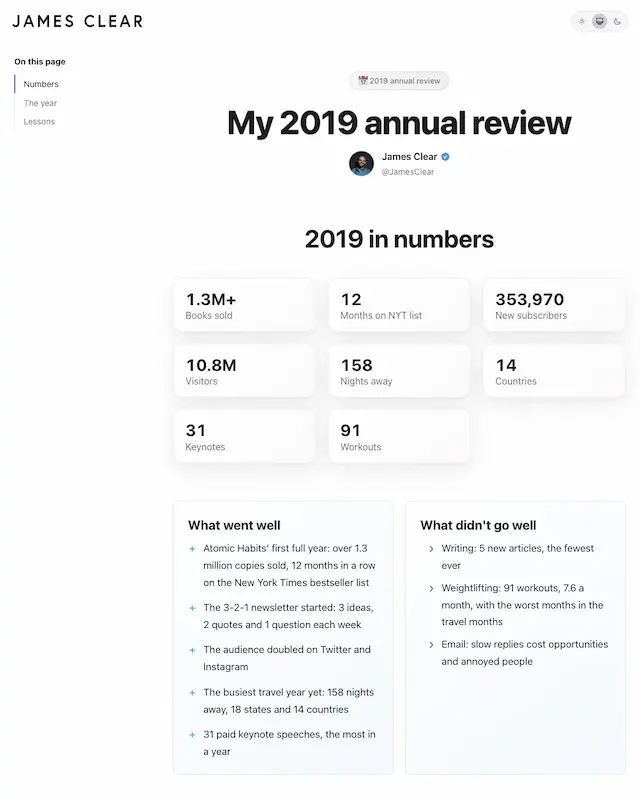
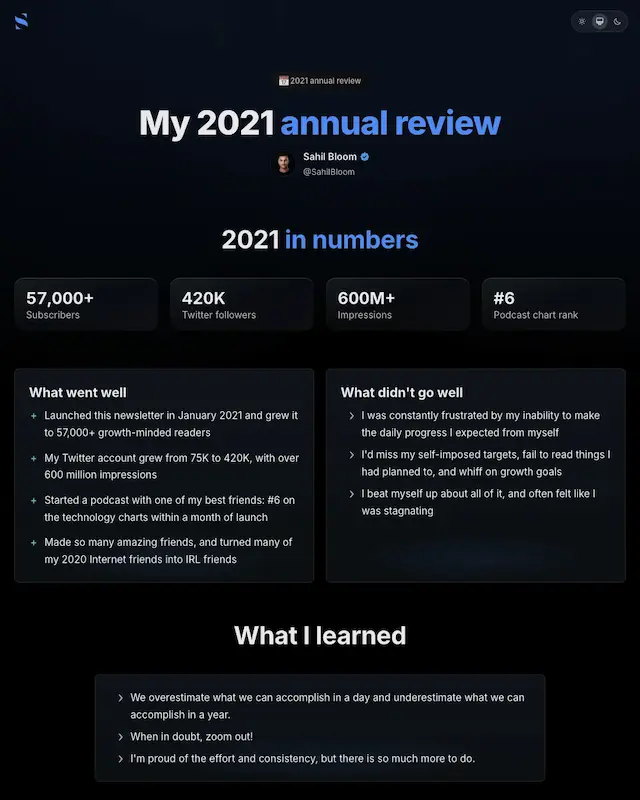
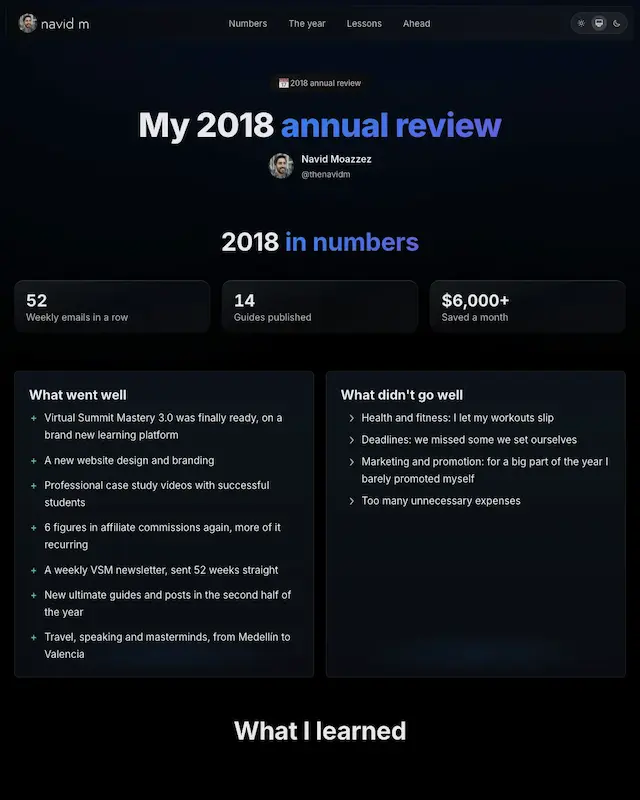
This free year in review page maker turns your annual review into a page on your own site, in your own brand.
Type your site or a profile, and your face, name, logo and colors fill the page. Pick what goes public, download the folder, and put it live anywhere.
TL;DRKey takeaways
What is a year in review page?
A year in review page is your annual review, published: your year in numbers, what went well, what didn't, what you learned, and what you're working toward next.
My annual reviews were always some of my most popular posts, and James Clear published his every year from 2013 to 2019. People like real numbers and honest misses.
What goes on your page
| Section | Public by default |
|---|---|
| Your year in numbers | Yes |
| What went well | Yes |
| What didn't go well | Yes |
| What you learned | Yes |
| What you're working toward | Yes |
| Photos, one a month | Yes |
| Best of the year | You choose |
| Your other answers | You choose |
| Scores, values, fears and your not-to-do list | Never, unless you tick them |
Any answer you mark private never reaches the page, whatever you tick.
How to use the year in review page maker
Where to put it
The download is a folder: each year in its own folder, and a page listing every year. It works on any host:
- Vercel, Netlify or Cloudflare Pages: drop the folder on the site, and you get a live link
- GitHub Pages, Hostinger, DigitalOcean or Railway: each has its steps in the tool
- Your own site: paste the prompt into Claude Code or Codex, and it adds the folder at /annual-review, or on a subdomain like review.yoursite.com
Prefer a post? Copy it as a blog post for WordPress, Substack, Ghost or Medium, or let AI draft the post from your answers.
Real examples
Open one in the tool to see the page it makes:
- My 2018 review: the year I took a few steps back to make giant leaps forward
- James Clear's 2019 review: the first full year of Atomic Habits, with 1.3 million copies sold and 158 nights away
- Sahil Bloom's 2021 review: the year his newsletter reached 57,000 readers and his Twitter grew from 75K to 420K
All 3 are built only from what each of us published. Read the originals: James Clear's 2019 annual review and Sahil Bloom's 2021 year in review.
Next year, add to it
Keep your plan file from this year. Next December, open it in the personal annual review template, do the new review, and download the folder again: every year, one place.
Keep your plan in front of you
Plan the weeks with


Year in Review Page FAQs
Questions about the year in review page? Here's what to know.
A year in review page is your annual review, published on your own site.
It shows your year in numbers, what went well, what didn't, what you learned, and what's next.
On any host: Vercel, Netlify, Cloudflare Pages, GitHub Pages, Hostinger or your own site.
The tool has the steps for each, and a prompt for Claude Code or Codex.
Yes, the prompt for your own site covers a path like /annual-review or a subdomain like review.yoursite.com.
Claude Code or Codex sets it up for you.
Yes, add your site and the page takes your logo and colors, or pick one of 8 styles.
Every style has light and dark.
Your scores, values, fears and not-to-do list stay private unless you tick them.
An answer you mark private never reaches the page.
Yes, keep this year's plan file and open it next December.
Download the folder again, and it holds every year.
Yes, it's free, with no login.
The pages it makes are yours, with a small credit at the bottom.
It's for creators, founders and anyone who shares their year in public.
It also works as a private page you only send to friends.
The post image generator makes a card of your year in numbers, and the personal annual review template plans next year.
See all my free tools.

Navid Moazzez
AI business strategist & AI OS builder
Navid Moazzez helps creators and founders master AI and build their own AI Operating System (AI OS) to automate their business and life.

Navid.me is reader-supported. When you buy through links on this site, I may earn an affiliate commission. Read the affiliate disclaimer.
More free tools


 X
X LinkedIn


Related MCP servers & CLIs

 Bluesky
 Substack
 Threads
 Mastodon
 TikTok


 Apple Podcasts
 Free AI newsletter
The most actionable AI newsletter for founders
Every week, get proven AI strategies, curated tools, and step-by-step systems to grow your audience, create better content, and build a profitable creator business.
No fluff, no filler, no BS. Just five minutes each week that might level up your online business and life.
P.S. Sign up now to get free access to my ultimate AI tools guide for creators.
