



Free Image Background Remover (+ Guide)





A free background remover that cuts out people, pets and products at your photo's full size, in your browser, with nothing uploaded.
0.0(0 ratings) by Navid Moazzez·Updated Sept 30, 2026·6 min read·Navid.me is reader-supported. When you buy through links on this site, I may earn an affiliate commission. Learn more.
This free background remover cuts the subject out of your photo at its full size, in your browser. People, hair, pets and camera gear come out with clean edges, and nothing is uploaded.
I built it to beat remove.bg, then tested both against cutouts made by hand. Here's what I measured, how it works, and what it still gets wrong.
TL;DRKey takeaways
What is a background remover?
A background remover finds the subject of a photo and makes everything else see-through. You get a transparent PNG to put on any background: white for a product shot, a color for a thumbnail, or a new photo.
Full size, not a preview
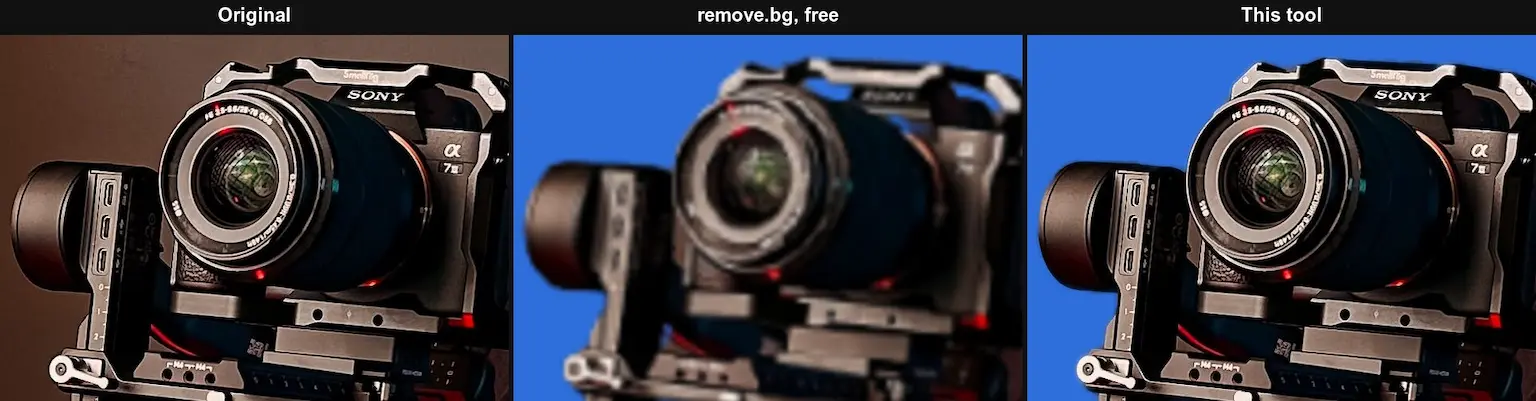
remove.bg's free download is a preview of about 0.25 megapixels. A 2027 x 3603 photo of a creator with a camera on a tripod came back 375 x 666.
This tool gives you back every pixel you put in, up to 50 megapixels. Here's that camera at 100%: the original, remove.bg's free result enlarged to the same size, and this tool.
And the hair, the same way:
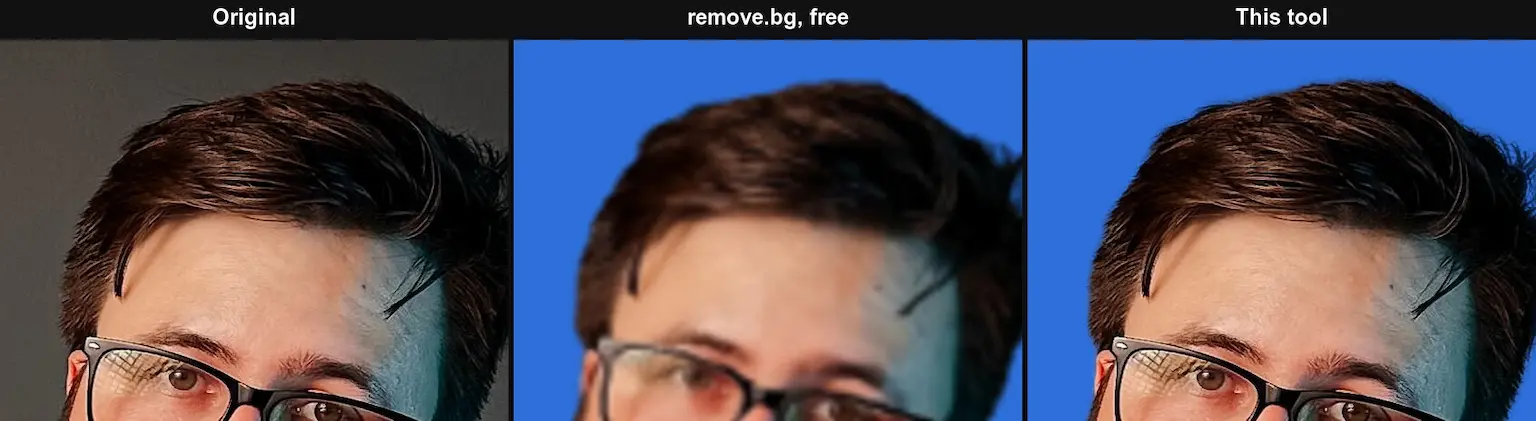
The photo is by Geancarlo Peruzzolo on Pexels. Drag the slider at the top of this page to see the same cutout yourself.
How close it gets to a cutout made by hand
I scored this tool and remove.bg against cutouts made by hand.
The number is the edge error: how far each cutout is from the hand-made one along the subject's outline, where cutouts go wrong. Lower is better.
- This tool
- 4.2%
- remove.bg, free
- 6.6%
- Closer to the hand-made cutout
- This tool on 6 of 6
- This tool
- 5.8%
- remove.bg, free
- 7.5%
- Closer to the hand-made cutout
- This tool on 5 of 6
- This tool
- 6.9%
- remove.bg, free
- 8.6%
- Closer to the hand-made cutout
- This tool on 8 of 9
- This tool
- 9.4%
- remove.bg, free
- 23.0%
- Closer to the hand-made cutout
- This tool on 2 of 3
- This tool
- 13.3%
- remove.bg, free
- 16.0%
- Closer to the hand-made cutout
- This tool on 4 of 5
On the 24 everyday photos, this tool was closer to the hand-made cutout on 21, with 35% fewer edge errors. People gained the most: 36% fewer, and closer on every portrait.
It lost three photos by less than a point each: a cat, a dandelion and a plastic bag of apples.
On gear and electronics, it was closer along the edge on 4 of the 5 photos remove.bg could be scored on.
In busy scenes, though, remove.bg more often picked the same subject as the hand-made cutout, like a tripod without the chair beside it.
How I tested
I tested on September 28, 2026, with two public photo sets made for testing cutouts. Neither was used to train the AI models in this tool, so it can't have learned the answers.
- What's in it
- Everyday photos, each with a cutout made by hand, hair by hair: people, animals, objects, plants and see-through things
- Photos
- 24 photos
- What's in it
- High-resolution photos of gear and electronics with pixel-exact cutouts: camcorders, a microphone, headphones, tripods, stands and lamps
- Photos
- 12 photos
remove.bg's cutouts came from its free API, at the free preview size. Its full-size download costs credits, so I didn't score it.
Part of remove.bg's error comes from its small free size. Its paid full-size result would score better, and I haven't tested it.
How it works
It runs three AI models in your browser, then fits the result to your photo:
| Step | What happens |
|---|---|
| Find the subject | An AI model marks what in the photo is the subject |
| Keep what you hold | A second model, trained on people, adds back an arm or a hand holding a camera |
| Hair and fur | A third model redraws only the soft parts: hair, fur and see-through edges |
| Full size | The cutout is fitted to every pixel of your photo, along the photo's own edges |
| Clean colors | The old background's tint comes out of the edges, so hair doesn't carry a green wall onto a white page |
Hard edges, like a camera body, skip the hair step and keep their sharp outline.
When I let the hair step run on every edge, hard edges came out softer and scored worse, so it only runs where the first model is unsure over an area.
What it still gets wrong
No background remover is perfect, and these are the photos where this one struggles most:
- See-through things – glass, water and plastic were the hardest for both tools, though remove.bg did far worse.
- Busy photos – when several things could be the subject, like a camera operator in a stadium crowd, it cuts out what stands out, which may not be what you meant.
- Look-alike colors – where the subject and the background share a color, edges can wander.
Compare shows the original and the cutout side by side, so you can check before you download.
remove.bg is moving to Canva
remove.bg's own site says its standalone website "will no longer be available from 1 December 2026". Its background removal is moving to Canva.
Canva has owned remove.bg since 2021, and remove.bg calls Canva's version the same background remover. So Canva's is the one I tested against.
Nothing is uploaded
Most background removers send your photo to their server. This one runs in your browser, so your photos never leave your computer.
The first time, your browser downloads the AI models once, 256 MB, and keeps them. They run on your graphics chip where your browser allows it.
Other background removers
If you'd rather use an app, these all remove backgrounds:
| Tool | Background removal |
|---|---|
 remove.bg remove.bg | Free previews at about 0.25 megapixels, full size for credits; the site closes on 1 December 2026 |
 Canva Canva | Where remove.bg's background remover is moving, free to try in HD |
 Adobe Express Adobe Express | Free with an Adobe account and a daily limit, for files up to 50 MB |
 Adobe Photoshop Adobe Photoshop | A Remove Background quick action, with a free trial or a plan |
 Magnific Magnific | Removes backgrounds, next to its retouching and upscaling |
 Picsart Picsart | A background remover in its editor, with a 7-day free trial of the paid plan |
Who is the background remover for?
It's for anyone who needs a subject without its background:
- Post image generator – creators putting themselves on thumbnails and social images
- Product photo background remover – sellers who need products on pure white
- Email signature generator – anyone adding a clean headshot to their email signature
- Image to 3D converter – anyone turning a cut-out object into a 3D model
- Video background remover – creators doing the same to a video of themselves
It works in your browser, so your photos stay on your computer.
Use your cutout
A transparent PNG can be large, so run it through the PNG compressor before you publish it.
For thumbnails and posts, put it on a background with the post image generator, or size it with the image resizer.
Design with your cutout
Design with


Edit photos with

Ask AI about it


Background Remover FAQs
Questions about the background remover? Here's what to know.
A background remover finds the subject of a photo and makes everything else see-through.
This one does it in your browser, at your photo's full size.
Yes, this background remover is free, with no account and no limit on photos.
It runs in your browser, so it costs nothing to run.
Yes, the cutout is the same size as your photo, up to 50 megapixels.
remove.bg's free download is about 0.25 megapixels.
Drop your photo, keep the background on See-through, and download the PNG.
The PNG keeps its see-through background, so it works on any color or photo.
Yes, pick White before you download, then save a JPG or a PNG.
Any other color works too.
Yes, on six portraits it was closer to a hand-made cutout than remove.bg on every one, with 36% fewer edge errors.
A second AI model redraws hair, fur and see-through edges, so flyaway strands stay.
On 24 test photos, it was closer to a hand-made cutout than remove.bg's free result on 21, with 35% fewer edge errors.
It also keeps your photo's full size, where remove.bg's free download is about 0.25 megapixels.
You can drop JPG, PNG, WebP, AVIF and HEIC photos, including iPhone photos.
Each can be up to 50 megapixels, and you can do 20 at once.
You get a PNG with a see-through background, or a PNG or JPG on the color you pick, at your photo's full size.
No, the background remover works in your browser.
Your photos never leave your computer.
It depends on your device and your photo's size.
The first time, your browser also downloads the AI models once: 256 MB.
remove.bg says its standalone website will no longer be available from 1 December 2026, and its background removal is moving to Canva.
This background remover stays free here.
There's the PNG compressor, the post image generator and the YouTube thumbnail downloader.
The rest are in free tools.
I did.
I'm Navid Moazzez, and the background remover is one of my free tools on navid.me.
Read more about me.

Navid Moazzez
AI business strategist & AI OS builder
Navid Moazzez helps creators and founders master AI and build their own AI Operating System (AI OS) to automate their business and life.

Navid.me is reader-supported. When you buy through links on this site, I may earn an affiliate commission. Read the affiliate disclaimer.
On this page
More free tools


 X
X LinkedIn
 Instagram
Related MCP servers & CLIs

 Bluesky
 Substack
 Threads
 Mastodon
 TikTok


 Apple Podcasts
 Free AI newsletter
The most actionable AI newsletter for founders
Every week, get proven AI strategies, curated tools, and step-by-step systems to grow your audience, create better content, and build a profitable creator business.
No fluff, no filler, no BS. Just five minutes each week that might level up your online business and life.
P.S. Sign up now to get free access to my ultimate AI tools guide for creators.
