



Free Image Resizer (+ Guide)





A free image resizer for any size, a percent or a platform's size, that works in your browser and uploads nothing.
0.0(0 ratings) by Navid Moazzez·Updated Sept 30, 2026·5 min read·Navid.me is reader-supported. When you buy through links on this site, I may earn an affiliate commission. Learn more.
This free image resizer changes JPG, PNG, WebP, AVIF and HEIC images to any size, in your browser.
Pick a size in pixels, a percent, or a platform's size like an Instagram post or a YouTube banner. Drop up to 50 images, and they're all resized at once.
Nothing is uploaded, and there's no watermark.
Here's what an image resizer does, the sizes each platform wants, how to fit a picture of another shape, and how it did against CloudConvert.
TL;DRKey takeaways
What is an image resizer?
An image resizer changes how many pixels wide and tall a picture is.
Make it smaller for a website or an upload form, bigger for a print, or the exact shape a platform wants for a post or a banner.
Sizes for each platform
The resizer has these sizes built in. Each one comes from the platform's own help page, which I checked on September 29, 2026:
 Instagram portrait post
- Size
- 1080 x 1350
- Shape
- 4:5
- Source
- Help page
Instagram square post- Size
- 1080 x 1080
- Shape
- 1:1
- Source
- Help page
Instagram landscape post- Size
- 1080 x 566
- Shape
- 1.91:1
- Source
- Help page
Instagram reel- Size
- 1080 x 1920
- Shape
- 9:16
- Source
- Help page
 YouTube thumbnail
- Size
- 3840 x 2160
- Shape
- 16:9
- Source
- Help page
YouTube channel banner- Size
- 2560 x 1440
- Shape
- 16:9
- Source
- Help page
 X header
- Size
- 1500 x 500
- Shape
- 3:1
- Source
- Help page
X profile photo- Size
- 400 x 400
- Shape
- 1:1
- Source
- Help page
 LinkedIn profile background
- Size
- 1584 x 396
- Shape
- 4:1
- Source
- Help page
 Facebook Page cover
- Size
- 851 x 315
- Shape
- 2.70:1
- Source
- Help page
Instagram keeps any photo 1080 pixels wide, with a shape from 1.91:1 to 4:5. So the 3 post sizes are its widest, squarest and tallest.
YouTube asks for a 3840 x 2160 thumbnail, but phone uploads stop at 2 MB. Add a 2 MB size target for those.
Fill, fit, border or stretch
When your picture's shape doesn't match the size, you choose what happens:
- What it does
- Fills the size exactly, and crops the edges from the middle
- Best for
- Posts, thumbnails, banners
- What it does
- Keeps the full picture, so 1 side comes out shorter
- Best for
- Photos for your own site
- What it does
- Keeps the full picture, and fills the rest with a color or transparency
- Best for
- Products and logos that can't be cropped
- What it does
- Fills the size by stretching the picture
- Best for
- Only when the shape is nearly right
Leave the width or the height empty and the picture keeps its shape.
Compared with CloudConvert
I resized the same 5 pictures here and with CloudConvert, at its default quality, and both came out at exactly the size I asked for:
- Resized to
- Instagram portrait, 1080 x 1350
- CloudConvert
- 280 KB
- This resizer
- 281 KB
- Resized to
- Square, 1080 x 1080
- CloudConvert
- 62 KB
- This resizer
- 57 KB
- Resized to
- YouTube banner, 2560 x 1440
- CloudConvert
- 1.3 MB
- This resizer
- 737 KB
- Resized to
- 1280 wide
- CloudConvert
- 193 KB
- This resizer
- 59 KB
- Resized to
- 50%
- CloudConvert
- 189 KB
- This resizer
- 85 KB
The resizer's files were the same size or smaller: the YouTube banner came out 45% smaller, and the 2 PNGs less than half the size.
The PNGs are packed the way the PNG compressor does it, with a score of 90 or more on each.
I then looked at every pair side by side at 100%. The photos look alike, this resizer's a little crisper. On the graphic, white text on a dark card stays bright here, and comes out thinner and grayer in CloudConvert's:
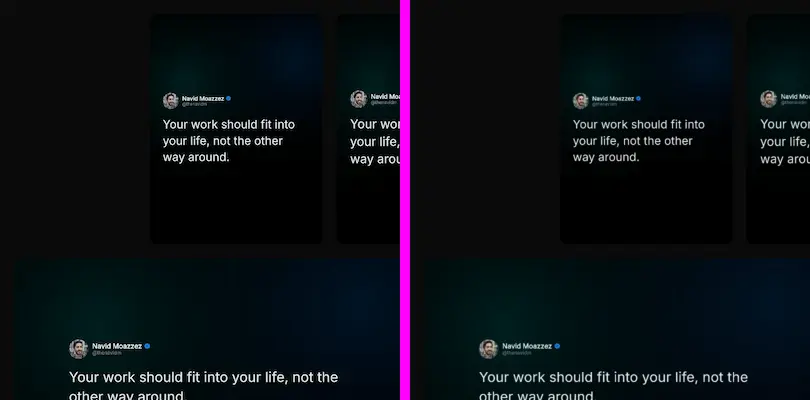
That's because this resizer works in linear light, the way light adds up. Bright detail keeps its brightness when pixels are merged, and edges don't get dark halos.
How I tested
I tested on September 29, 2026, with this page's own engines at the High setting, and CloudConvert's API at its default settings, keeping each picture's format.
I didn't score the two against each other, because a score needs a perfect picture at the new size to compare with. There isn't a neutral one, since each resizer's math gives a slightly different "right" answer.
So I compared the sizes, and checked the results by eye.
The score this page shows on each result is different. It compares the saved file with the resized picture before saving, so it tells you how much the compression changed.
Nothing is uploaded
Most online resizers send your file to their server and send back the result. This one works in your browser, so your images never leave your computer.
The new file also leaves out your photo's hidden details, like the camera that took it and where. Only the picture itself is kept, turned the right way up.
Who is the image resizer for?
It's for anyone who needs a picture at an exact size:
- Post image generator – creators making images for each platform
- Instagram grid maker – anyone planning a profile grid
- Product photo background remover – sellers fitting product photos to a marketplace
- YouTube thumbnail downloader – creators studying thumbnails at their real size
It works in your browser, so your photos never leave your computer.
More free image tools
Here are more of my free image tools, all working in your browser the same way:
- Image compressor – make a resized image smaller still
- Image background remover – cut the subject out first
- HEIC to JPG – turn iPhone photos into JPGs that open anywhere
- Compress image to 100 KB – fit an upload form's limit
None of them upload your pictures, and none add a watermark.
Design and edit your images
Design them with


Edit photos with


Make and edit images with AI


Ask AI about them


Image Resizer FAQs
Questions about the image resizer? Here's what to know.
An image resizer changes how many pixels wide and tall a picture is.
This one resizes to any size, a percent or a platform's size, in your browser.
1080 pixels wide, and from 566 to 1350 pixels tall, per Instagram's help center.
Pick Instagram portrait for the tallest post, 1080 x 1350.
Drop your image here, pick a size or a platform, and click Resize.
Download each image, or all of them as a ZIP.
Keep the quality on High, which scores each file against the resized picture.
For no change at all, pick PNG and Lossless.
Yes, up to 50 megapixels.
A bigger picture can't gain detail, so it can look softer, and the result says when it was made bigger.
YouTube asks for 3840 x 2160 pixels, and at least 640 wide.
Phone uploads stop at 2 MB, so add a 2 MB size target for those.
Pick Fit inside to keep the full picture, or Add a border to fill the size around it.
The border can be any color, or see-through in PNG and WebP.
Yes, drop up to 50 images at once, 50 megapixels each.
They all get the same size and format.
Yes, in PNG, WebP and AVIF.
JPG has none, so see-through parts get a background color you pick.
Yes, it's free, with no account and no limit on files.
It runs in your browser, so it costs nothing to run.
No, the image resizer works in your browser.
Your images never leave your computer.
I did.
I'm Navid Moazzez, and the image resizer is one of my free tools on navid.me.
Read more about me.

Navid Moazzez
AI business strategist & AI OS builder
Navid Moazzez helps creators and founders master AI and build their own AI Operating System (AI OS) to automate their business and life.

Navid.me is reader-supported. When you buy through links on this site, I may earn an affiliate commission. Read the affiliate disclaimer.
More free tools

Related MCP servers & CLIs

 Bluesky
 Substack
 Threads
 Mastodon
 TikTok


 Apple Podcasts
 Free AI newsletter
The most actionable AI newsletter for founders
Every week, get proven AI strategies, curated tools, and step-by-step systems to grow your audience, create better content, and build a profitable creator business.
No fluff, no filler, no BS. Just five minutes each week that might level up your online business and life.
P.S. Sign up now to get free access to my ultimate AI tools guide for creators.
