



Product Background Remover (+ Guide)





A free product photo background remover that puts your products on pure white, or see-through, at full size, with nothing uploaded.
3.0(2 ratings) by Navid Moazzez·Updated Sept 30, 2026·4 min read·Navid.me is reader-supported. When you buy through links on this site, I may earn an affiliate commission. Learn more.
This free product photo background remover cuts your product out at its full size, and puts it on pure white, in your browser.
Or keep it see-through, or pick any color. Nothing is uploaded, and there's no watermark.
Here's what a product photo background remover is, how white the white is, how close it gets on real gear, and where it still struggles.
TL;DRKey takeaways
What is a product photo background remover?
A product photo background remover cuts your product out of its photo, and puts it on a clean background.
It's how a phone photo on a kitchen table becomes a catalog photo on white. This one is my image background remover, opening on white for product shots.
Pure white, at full size
The white is exactly #FFFFFF, with no gray left in the corners.
Many marketplaces ask for a pure white background on the main photo, so check your marketplace's own rules for the rest.
Your photo comes back at every pixel you put in, up to 50 megapixels. Here's a camera at 100%: the original, remove.bg's free result enlarged to the same size, and this tool.
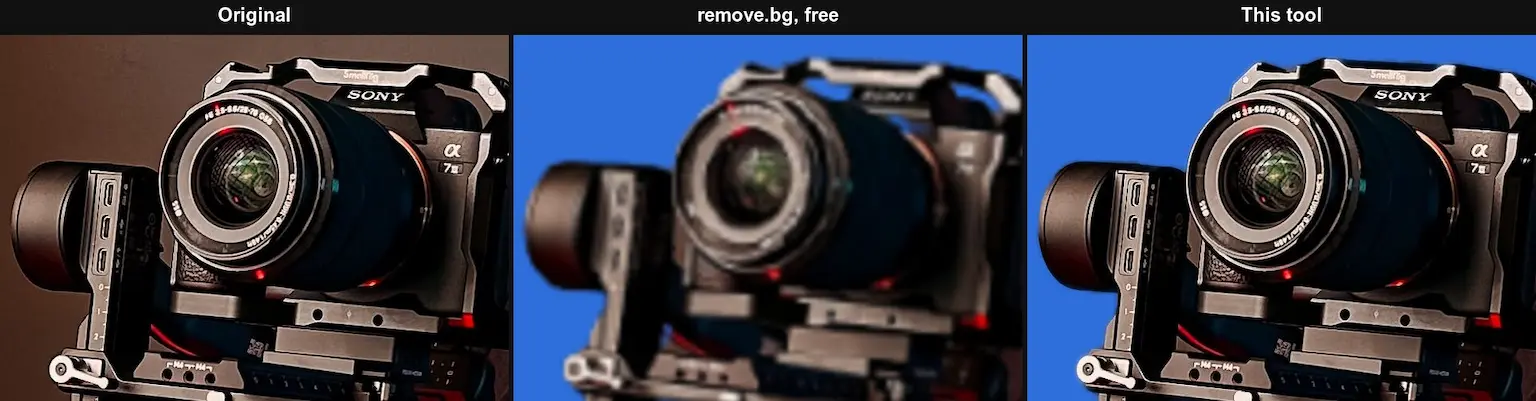
The photo is by Geancarlo Peruzzolo on Pexels.
How close it gets on products
I scored this tool against 12 photos of gear and electronics from DIS5K, a public photo set with pixel-exact cutouts: camcorders, a microphone, headphones, tripods, stands and lamps.
On the 5 photos remove.bg's free result could be scored on, this tool's edge error was 13.3% against remove.bg's 16.0%. It was closer along the edge on 4 of 5.
Lower is better, and the image background remover page has the full test.
How it works
It runs three AI models in your browser, then fits the result to your photo:
| Step | What happens |
|---|---|
| Find the subject | An AI model marks what in the photo is the subject |
| Keep what you hold | A second model, trained on people, adds back an arm or a hand holding a camera |
| Hair and fur | A third model redraws only the soft parts: hair, fur and see-through edges |
| Full size | The cutout is fitted to every pixel of your photo, along the photo's own edges |
| Clean colors | The old background's tint comes out of the edges, so hair doesn't carry a green wall onto a white page |
Hard edges, like a bottle or a camera body, skip the hair step and keep their sharp outline.
The first time, your browser downloads the AI models once, 256 MB, and keeps them.
What it still gets wrong
These are the product photos it finds hardest:
- See-through products – glass, water and clear plastic are the hardest for any background remover.
- Busy photos – when several things could be the product, it cuts out what stands out, which may not be what you meant.
- Look-alike colors – a white product on a white table can lose part of its edge.
Touch up fixes any of these by hand: paint with Restore to bring back what it missed, or Erase to clear what it kept.
Who is the product photo background remover for?
It's for anyone selling products with photos:
- Image resizer – sellers fitting photos to each marketplace's size
- Image compressor – shop owners keeping product pages fast
- Image to 3D converter – sellers turning a product photo into a 3D model
- Post image generator – brands posting their products on social media
It works in your browser, so photos of unreleased products stay on your computer.
More free background removers
Here are my other free background tools. Each one works in your browser, at full size:
- Image background remover – cut the subject out of any photo, hair and all
- Logo background remover – make a logo see-through, letter holes and all
- Signature background remover – turn a photo of your signature into a PNG
- Video background remover – blur, change or remove the background of a video
None of them upload your files, and none add a watermark.
Design with your cutout
Design with


Edit photos with


Ask AI about it


Product photo background remover FAQs
Questions about the product photo background remover? Here's what to know.
A tool that cuts your product out of its photo and puts it on white, a color, or nothing at all.
This one does it in your browser, at full size.
Drop your photo here, keep White, and click Remove the background.
Then download a JPG or a PNG on white.
Yes, it's exactly #FFFFFF, RGB 255, 255, 255.
Check your marketplace's own rules for how much of the photo the product should fill.
Yes, up to 20 at once, 50 megapixels each.
See-through products are the hardest for any background remover.
Check the edges with Compare, and use Touch up to fix them.
Yes, it's free, with no account and no limit.
It runs in your browser, so it costs nothing to run.
No, the product photo background remover works in your browser.
Your photo never leaves your computer.
I did.
I'm Navid Moazzez, and the product photo background remover is one of my free tools on navid.me.
Read more about me.

Navid Moazzez
AI business strategist & AI OS builder
Navid Moazzez helps creators and founders master AI and build their own AI Operating System (AI OS) to automate their business and life.

Navid.me is reader-supported. When you buy through links on this site, I may earn an affiliate commission. Read the affiliate disclaimer.
More free tools

 Instagram
Related MCP servers & CLIs

 Bluesky
 Substack
 Threads
 Mastodon
 TikTok


 Apple Podcasts
 Free AI newsletter
The most actionable AI newsletter for founders
Every week, get proven AI strategies, curated tools, and step-by-step systems to grow your audience, create better content, and build a profitable creator business.
No fluff, no filler, no BS. Just five minutes each week that might level up your online business and life.
P.S. Sign up now to get free access to my ultimate AI tools guide for creators.
